Description
FX File Explorer is a file manager with optional media, networking, cloud, and
root capabilities.
FX is designed to let you quickly and easily manage all content on your phone or tablet.
FX has no ads.
The free main module of FX File Explorer (this product) includes all file management features for working with files on your phone/tablet.
The "FX Plus" add-on adds media management, network (FTP, SFTP, SMB, WebDAV) and cloud capabilities (Dropbox, Google Drive, SkyDrive, Box, SugarSync). The "Plus" add-on is a paid app (with a 7-day free trial).
The free "FX Root" add-on is for developers and knowledgeable enthusiasts who need to make changes as the root user.
General Features (included standard):
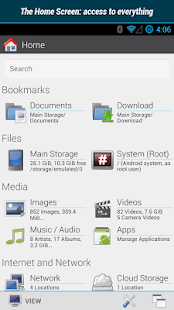
- Productivity-oriented layout: The "Home Screen" shows bookmarks, storage, tools and (with FX+) media/network locations. You no longer have to wade through the garbage that apps store in the root folder of your SD card to get to the places you actually use.
- Holo-based UI.
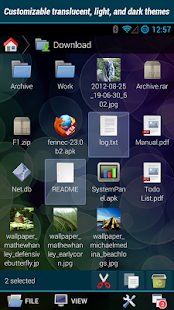
- Dual pane mode and unlimited windows (quickly switch between different locations).
- Pinch-to-zoom in any "Explorer" window, zoom-in to see additional information about items.
- Intuitive swipe-to-select gesture for managing multiple items (Slide finger horizontally across items to select/deselect them; see YouTube Videos, web site documentation, or in-app help for more information).
- "Usage View" mode analyzes storage space usage, enabling you to see total size of any folder (and it works while browsing).
- Indexed Search.
- File Viewers / Editors (included standard).
- Text Editor with Undo/Redo history, Cut/Copy/Paste, Find, and Pinch-to-zoom.
- Binary (Hex) Viewer.
- Image Viewer.
- Zip, Tar, GZip, and Bzip2 Archive Extractor / Creator (.zip, .tgz, .tar.gz, .tar.bz2).
- RAR Extractor (UnRAR).
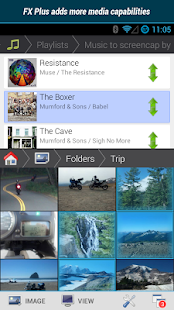
Media Capabilities (FX Plus add-on required):
- Browse image and video collections.
- Browse audio by artist, album, playlist, or all tracks.
- Create and rearrange playlists with drag and drop (multiple files can be rearranged by selecting them).
Network / Cloud Capabilities (requires FX Plus add-on):
- Windows networking (SMB).
- FTP (including secure FTP-S and FTP-ES).
- SSH FTP (Secure Shell FTP; password and public key auth).
- WebDAV (see help for using WebDAV with OwnCloud).
- Cloud Storage: Google Drive (incl. Google Docs), Dropbox, SugarSync, Box (Box.net), and SkyDrive (SkyDrive requires Android 2.2 or later).
- Stream video and audio media files from SMB, FTP, SSH, Google Drive, Dropbox, SugarSync, Box, and SkyDrive to media player applications.
- Browse local network for Windows (SMB) shares.
- Find FTP and SSH FTP local network shares using multicast DNS (mDNS) service discovery (Bonjour/Zeroconf/Avahi).
- Encrypted keyring (used to avoid entering sensitive passwords in public while not allowing access in event of device theft).
- Download and convert Google Drive / Google Docs files into Microsoft Word, Excel, PowerPoint, OpenDocument, PDF, and other formats.
Bluetooth Capabilities (FX Plus add-on required):
- Bluetooth FTP Client.
- Discover / pair devices from within FX File Explorer
* Note: sending files via Bluetooth is supported in free version, if your devices support Bluetooth Push.
Additional FX Plus Features:
- AES-256, AES-128 Zip Encryption. Browse inside encrypted Zip files, viewing text documents, images, audio, and video without writing unencrypted data to SD card.
- App Management.
- Browse apps by permission
NOTES:
- Streaming video playback: Format support is based upon third-party playback software installed on your device.
- Android typically supports MP4 and 3GP. FX can play AVI, FLV, MKV, and WMV formats *IF* you install third-party players available from the Google Play Store.
- GDrive / GDocs: Cut/pasted documents will be converted to Microsoft Office formats by default. Use "Open With" to download them in the format of your choice.
 What's New
- New Holo User Interface
- Dual pane view, works in portrait and landscape views, resizable
- Customizable light, dark, and translucent light/dark themes
- Pinch-to-Zoom support in all "Explorer" views
- Experimental support for transfer auto-resume (disabled by default, must be enabled in settings)
- Support for new Box 2.0 API (unfortunately Box connections must be re-created; Box is discontinuing support for the older API)
- Fixed Box homesecreen bookmark crash
Requires Android
2.1 and up
Updated
December 19, 2013
Current Version
2.1.1.2


Please leave a
comment for
Broken Links.